

XenForo Enhanced Search, hızlı ve doğru arama sonuçları sunmak için Elasticsearch'ten yararlanan güçlü bir eklentidir. Bu rehber, XenForo Enhanced Search ile birlikte kullanmak üzere bir Linux sunucusunda Elasticsearch 8'in kurulum ve yapılandırma adımlarını anlatır.
Sistem Gereksinimleri
- Bir Linux sunucusu (CentOS, AlmaLinux veya CloudLinux önerilir).
- Root veya sudo erişimi.
- Enhanced Search eklentisiyle XenForo 2.2 veya üzeri.
- Java 11 (OpenJDK).
- Minimum 2 GB RAM (4 GB önerilir).
Adım 1: Java'yı Kurun
Elasticsearch 8 için Java 11 veya daha yeni bir sürüm gereklidir.
Code:
sudo dnf install -y java-11-openjdk-devel
Code:
java -versionAdım 2: Elasticsearch GPG Anahtarını ve Repoyu Ekleyin
GPG anahtarını içe aktarın:
Code:
sudo rpm --import https://artifacts.elastic.co/GPG-KEY-elasticsearchDepo yapılandırma dosyasını oluşturun:
Code:
cat <<EOF | sudo tee /etc/yum.repos.d/elasticsearch.repo
[elasticsearch]
name=Elasticsearch repository for 8.x packages
baseurl=https://artifacts.elastic.co/packages/8.x/yum
gpgcheck=1
gpgkey=https://artifacts.elastic.co/GPG-KEY-elasticsearch
enabled=1
autorefresh=1
type=rpm-md
EOF
Adım 3: Elasticsearch'ü Kurun
Paketi kurun:
Code:
sudo dnf install -y elasticsearchÖNEMLİ!!!
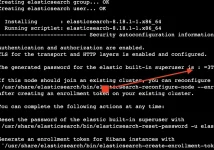
Kurulumdan sonra sistem, dahili elastic kullanıcısı için bir şifre üretir ve varsayılan olarak HTTPS ile kullanıcı kimlik doğrulamasını yapılandırır. Üretilen şifreyi mutlaka kaydedin.
Şifreyi kaçırırsanız daha sonra şu komutla sıfırlayabilirsiniz:
Code:
/usr/share/elasticsearch/bin/elasticsearch-reset-password -u elasticAdım 4: Elasticsearch'ü Etkinleştirin ve Başlatın
Sistem başlangıcında çalışacak şekilde etkinleştirin:
Code:
sudo systemctl daemon-reload
sudo systemctl enable elasticsearch.service
sudo systemctl start elasticsearch.service
Çalıştığını doğrulayın:
Code:
sudo systemctl status elasticsearch
Code:
curl -u elastic:'sifre' https://localhost:9200 --insecureBaşarılı olursa cluster detaylarıyla bir JSON yanıtı döner.
Adım 5: XenForo Enhanced Search Yapılandırması
XenForo Admin Control Panel'de:- Setup > Options > Search Options menüsüne gidin.
- Configure Enhanced Search düğmesine tıklayın.
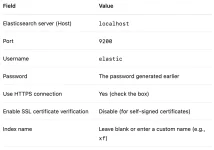
Test settings düğmesine tıklayarak bağlantıyı doğrulayın. Başarılı olduğunda ayarları kaydedin.
Adım 6: Arama İndeksini Yeniden İnşa Edin
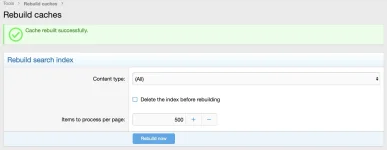
Şu yola gidin:Tools > Rebuild Caches > Rebuild Search Index
Bu işlem Elasticsearch indeksinizi forum içeriğinizle doldurur.
Hepsi bu!
XenForo Enhanced Search is a powerful extension that leverages Elasticsearch to deliver faster and more accurate search results. This guide walks you through the steps of installing and configuring Elasticsearch 8 on a Linux server for use with XenForo Enhanced Search.
System Requirements
- A Linux server (CentOS, AlmaLinux, or CloudLinux recommended).
- Root or sudo access.
- XenForo 2.2 or later with Enhanced Search add-on.
- Java 11 (OpenJDK).
- 2 GB RAM minimum (4 GB recommended).
Step 1: Install Java
Elasticsearch 8 requires Java 11 or newer.
Code:
sudo dnf install -y java-11-openjdk-devel
Code:
java -versionStep 2: Add Elasticsearch GPG Key and Repository
Import the GPG key:
Code:
sudo rpm --import https://artifacts.elastic.co/GPG-KEY-elasticsearchCreate the repository configuration file:
Code:
cat <<EOF | sudo tee /etc/yum.repos.d/elasticsearch.repo
[elasticsearch]
name=Elasticsearch repository for 8.x packages
baseurl=https://artifacts.elastic.co/packages/8.x/yum
gpgcheck=1
gpgkey=https://artifacts.elastic.co/GPG-KEY-elasticsearch
enabled=1
autorefresh=1
type=rpm-md
EOF
Step 3: Install Elasticsearch
Install the package:
Code:
sudo dnf install -y elasticsearchIMPORTANT!!!
After installation, the system will generate a password for the built-in elastic user and configure HTTPS and user authentication by default. Save the generated password.
If you missed the password, you can reset it later with:
Code:
/usr/share/elasticsearch/bin/elasticsearch-reset-password -u elasticStep 4: Enable and Start Elasticsearch
Enable Elasticsearch to start on boot:
Code:
sudo systemctl daemon-reload
sudo systemctl enable elasticsearch.service
sudo systemctl start elasticsearch.service
Verify it is running:
Code:
sudo systemctl status elasticsearch
Code:
curl -u elastic:'yourpassword' https://localhost:9200 --insecureIf successful, it will return a JSON response with cluster details.
Step 5: Configure XenForo Enhanced Search
In your XenForo Admin Control Panel:- Go to Setup > Options > Search Options.
- Click Configure Enhanced Search.
Click Test settings to verify the connection. If successful, save the settings.
Step 6: Rebuild Search Index
Go to:Tools > Rebuild Caches > Rebuild Search Index
This process will populate your Elasticsearch index with your forum content.
That's all!


