

Genel Bakış
XenForo, route filter cache'ini varsayılan olarak siz bir route filtresi ekledikçe, düzenledikçe veya kaldırdıkça otomatik olarak günceller. Ancak Admin CP içindeki standart "Rebuild Caches" seçeneği eski route filtrelerini temizlemiyorsa veya yenilerini düzgün uygulamıyorsa, XenForo'nun "Development mode" özelliğini etkinleştirip CLI komutu çalıştırarak yeniden inşa edebilirsiniz. Bu rehber, adım adım yolu gösterir.Önemli Notlar
- Development mode öncelikle geliştirme ve test amaçlıdır; canlı forumda günlük kullanım için tasarlanmamıştır.
- Bu yöntemi yalnızca standart Admin CP "Rebuild Caches" yaklaşımı route filtrelerini güncelleyemediğinde kullanın.
- İşlem bittikten sonra dev mode'u tekrar devre dışı bırakmanız kesinlikle önerilir.
Adım 1: Development Mode'u Etkinleştirin
- Sunucuya SSH ile bağlanın veya dosya düzenlemenize izin veren bir araç kullanın.
- XenForo'nun temel yapılandırma dosyasını açın. Genellikle şu yoldadır:
Code:src/config.php - Dosyada <?php bloğunun içine aşağıdaki satırı ekleyin (veya yorum işaretini kaldırın):
Code:$config['development']['enabled'] = true;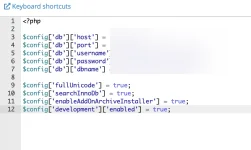
- Değişiklikleri kaydedin ve dosyayı kapatın.
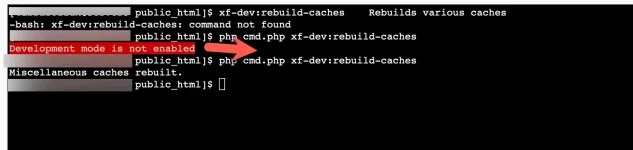
XenForo kurulumunuz artık geliştirme modundadır.
Adım 2: Rebuild Komutunu Çalıştırın
- XenForo kök dizininde olduğunuzdan emin olun (cmd.php veya cli.php'nin bulunduğu yer). cPanel için:
Code:cd /home/kullanici/public_html - Komut satırından şunu çalıştırın:
Code:php cmd.php xf-dev:rebuild-caches - XenForo, route filtreleri dahil tüm iç cache'leri yeniden inşa eder.
Adım 3: Development Mode'u Devre Dışı Bırakın (Önerilir)
Rebuild tamamlandığında, üretim sitesinde standart moda dönmek en güvenlisidir:- src/config.php dosyasını yeniden açın.
- Şu satırı yorum hâline getirin veya silin:
Code:$config['development']['enabled'] = true; - Kaydedin ve kapatın.
Artık development mode kapatılmış olur.
Sonuç
Bu adımları tamamladıktan sonra eski route filtreleri görünmez ve yeni veya değiştirilmiş filtreler XenForo tarafından tam olarak tanınır. Sorun devam ederse, CDN veya sunucu seviyesinde (örneğin .htaccess rewrite'ları) hâlâ eski rotaları sunan bir önbellek olmadığından emin olun.Overview
By default, XenForo updates its route filter cache automatically whenever you add, edit, or remove route filters. However, if the standard "Rebuild Caches" option in the Admin CP is not clearing out old route filters (or not applying new ones properly), you can force a rebuild by enabling XenForo's "Development mode" and running a CLI command. This guide shows you how.Important Notes
- Development mode is meant primarily for development and testing, not for everyday use on a live forum.
- Use this method only if the standard Admin CP "Rebuild Caches" approach is failing to update route filters.
- After you finish, it's strongly recommended that you disable dev mode again.
Step 1: Enable Development Mode
- Connect to your server via SSH or use a tool that allows you to edit files on your server.
- Locate and open XenForo's primary configuration file, typically at:
Code:src/config.php - In that file, add (or uncomment) the following line inside the <?php block:
Code:$config['development']['enabled'] = true; - Save the changes and close the file.
Your XenForo installation is now in development mode.
Step 2: Run the Rebuild Command
- Make sure you are in the XenForo root directory (where cmd.php or cli.php is located). For cPanel:
Code:cd /home/username/public_html - From the command line, run:
Code:php cmd.php xf-dev:rebuild-caches - XenForo will now rebuild various internal caches, including those related to route filters.
Step 3: Disable Development Mode (Recommended)
Once the rebuild completes, it's best to revert to standard (non-dev) mode on a production site:- Reopen src/config.php.
- Comment out or remove the line:
Code:$config['development']['enabled'] = true; - Save and close the file.
You have now disabled development mode.
Conclusion
After completing these steps, old route filters should no longer appear, and any new or modified filters will be fully recognized by XenForo. If issues persist, ensure there is no CDN or server-level caching (such as .htaccess rewrites) still serving outdated routes.
Last edited:


